
Selecting the right e-commerce platform is one of the most critical decisions you’ll make when launching an online store. Two names dominate the conversation: WooCommerce and Shopify. Both are powerful, capable, and widely used – but they serve fundamentally different business needs and operator skill levels.
This comprehensive guide breaks down every aspect of each platform, from pricing and customization to scalability and business type suitability. By the end, you’ll understand exactly which platform aligns with your business goals, technical capabilities, and budget.
WooCommerce vs. Shopify: Overview
What Is WooCommerce?
WooCommerce is a free, open-source e-commerce plugin built for WordPress. It transforms your WordPress site into a fully functional online store, giving you complete control over design, functionality, and data.
Key Characteristics:
- Free to install and use
- Self-hosted (you choose and manage your hosting)
- Requires WordPress knowledge or developer support
- Unlimited customization through code and plugins
- Best for experienced users, developers, and agencies
What Is Shopify?
Shopify is a hosted, all-in-one e-commerce platform owned by Shopify Inc. You don’t need to manage hosting, servers, or infrastructure – Shopify handles everything.
Key Characteristics:
- Monthly subscription (no free option)
- Fully hosted and maintained by Shopify
- Beginner-friendly with minimal technical knowledge required
- Customization limited to themes and apps
- Best for solopreneurs, small businesses, and non-technical entrepreneurs
Pricing: True Cost of Ownership
Understanding the real cost of each platform is essential. Initial pricing can be misleading without accounting for hidden expenses.
WooCommerce Pricing Breakdown
WooCommerce itself is free, but your total cost includes:
| Component | Cost |
| Hosting (Managed) | $55–$200+/month |
| Domain Name | $10–$15/year |
| Premium Plugins | $50–$500+/year |
| Professional Theme | $30–$100 (one-time) |
| Maintenance & Support | $165–$500/month (optional) |
| Payment Processor Fees | 2.9% + $0.30 per transaction |
| SSL Certificate | Included (most hosts) |
Estimated Monthly Cost:
- Small Store: $100 – $150/month
- Growing Store: $200 – $400/month
- Enterprise: $400 – $1,000+/month (with dedicated maintenance)
3-Year Total Cost Example:
- Small store with professional maintenance: $9,000 – $12,000
- Without maintenance: $3,600 – $5,400
Shopify Pricing Breakdown
Shopify operates on a straightforward subscription model with transaction fees:
| Plan | Monthly Cost | Key Features |
| Starter | $39 | Solo entrepreneurs, 1st month $1 deal |
| Basic | $39 | Up to 5 staff accounts, basic reports |
| Shopify | $105 | 15 staff accounts, advanced reports, 0.8% transaction fee |
| Advanced | $299 | 25 staff accounts, custom reports, 0.7% transaction fee |
| Shopify Plus | $2,000–$40,000 | Enterprise features, dedicated support |
Additional Costs:
- Transaction fees (if not using Shopify Payments): 2.9% + 30¢ per transaction
- Apps (many essential features require paid apps): $50 – $300+/month
- Premium themes: $140 – $350 (one-time)
- Paid support beyond live chat
Estimated Monthly Cost:
- Starter/Basic Plan: $39–$100/month (with apps)
- Shopify Plan: $105–$250/month (with apps and transaction fees)
- Advanced Plan: $299–$500+/month
3-Year Total Cost Example:
- Basic plan with apps and transaction fees: ~$12,000–$16,000
- Shopify plan with full features: ~$18,000–$27,000
Verdict: Pricing
WooCommerce wins for high-revenue stores (long-term TCO can be 20–30% lower after scaling). Shopify wins for simplicity and predictability (fixed costs make budgeting easier for startups).
Customization & Flexibility
WooCommerce: Unlimited Customization
WooCommerce gives you complete control over every aspect of your store:
What You Can Customize:
- Code Access: Full access to PHP, JavaScript, CSS, and HTML
- URL Structure: Create any URL format you want (crucial for SEO)
- Checkout Process: Completely redesign the checkout flow
- Database: Direct access to store data
- Headless Commerce: Decouple frontend and backend for advanced implementations
- Payment Gateways: Integrate any payment processor
- Product Complexity: Unlimited product variations and configurations
Customization Examples:
- Build a marketplace with multiple vendors using plugins like Dokan
- Create a subscription service with recurring billing
- Develop a B2B portal with custom pricing rules
- Integrate with ERP, CRM, or warehouse management systems
Trade-off: Requires developer expertise or significant agency costs.
Shopify: Limited but Sufficient Customization
Shopify restricts customization to protect stability, security, and performance:
What You Can Customize:
- Themes: Select from pre-built themes and customize within theme limitations
- App Ecosystem: Install apps for extended functionality
- Product Display: Customize product pages with theme options
- Checkout Basics: Limited customization through Shopify Flow (Shopify Plus only)
- Meta Tags & SEO Basics: Add page titles, meta descriptions, alt text
What You CAN’T Customize:
- Core Checkout Structure: Cannot remove Shopify’s checkout flow or add custom fields
- URL Structure: Fixed format (/products/, /collections/)
- Payment Processing: Limited to Shopify Payments or approved gateways
- Code Access: Limited Liquid code editing (restricted variables and functions)
Limitation Examples:
- Cannot change product URL from /products/product-name to /product-name
- Cannot create a fully custom checkout experience
- Cannot build true marketplace functionality
- Limited headless commerce capabilities (traditional only)
Verdict: Customization
WooCommerce wins decisively for businesses requiring custom functionality, complex product configurations, or unique business logic. Shopify wins for speed-to-market and avoiding technical debt if you don’t need advanced features.
SEO & Search Engine Visibility
SEO performance directly impacts your organic traffic and customer acquisition costs. The differences here are substantial.
WooCommerce: Superior SEO Control
WooCommerce provides complete SEO flexibility:
SEO Advantages:
- Full URL Control: Create keyword-optimized, short URLs (critical for rankings)
- Meta Tag Customization: Complete control over all meta tags and schema markup
- Structured Data: Implement rich snippets, product schema, breadcrumbs, and custom JSON-LD
- Headless Commerce: Decouple frontend for advanced performance optimization
- Robots.txt & Sitemap: Full control over crawl directives and indexing
- Internal Linking: Complete flexibility for link structure
- Page Speed: Optimize hosting, caching, and code for maximum speed
SEO Tools Integration:
- Yoast SEO, Rank Math, All in One SEO (plugins offer detailed optimization)
- Integration with Google Search Console, Analytics, and Tag Manager (native)
- API access for custom SEO implementations
Real-World Impact:
- Short, descriptive URLs: /running-shoes vs. /products/running-shoes
- Custom product snippets in search results
- Faster site speed through hosting optimization
Shopify: Basic SEO with Restrictions
Shopify handles SEO adequately but with platform limitations:
SEO Limitations:
- Fixed URL Structure: Cannot remove /products/ or /collections/ segments
- Product URL: yourstore.com/products/product-name (longer, less optimized)
- Collection URL: yourstore.com/collections/category-name
- Limited Meta Tag Control: Restricted variables and conditional logic
- Duplicate Content Risk: Limited control over canonicalization
- Schema Markup Limitations: Pre-built schema with limited customization options
- No Headless Optimization: Traditional only (some headless possible but limited)
Shopify SEO Tools:
- Basic built-in SEO editor (title, description, URL handle, meta tags)
- Apps for advanced SEO (added cost, less control than plugins)
- No native Yoast/Rank Math equivalent
Real-World Impact:
- Longer URLs reduce click-through rates in search results
- Limited ability to optimize meta tags for specific search intent
- Harder to implement advanced schema for rich snippets
Verdict: SEO
WooCommerce wins decisively for SEO control and long-term organic growth strategy. For competitive niches, WooCommerce’s flexibility is a significant advantage. Shopify is acceptable for small niches with less competition; the platform limits are rarely a deciding factor for new stores.
Scalability & Growth
WooCommerce: Scales with Your Hosting
WooCommerce scalability depends entirely on your hosting infrastructure:
Scaling Advantages:
- Unlimited Products: No product count limits (Shopify’s Winter 2026 update now allows 2,048 variants, but WooCommerce still unlimited)
- Flexible Hosting: Upgrade from shared hosting to VPS, dedicated servers, or cloud infrastructure
- Custom Infrastructure: Implement CDNs, caching layers, and database optimization
- Multi-Store Management: Run multiple WooCommerce stores under one WordPress network
- API-First Flexibility: Integrate with any third-party system as you grow
Growth Challenges:
- You’re responsible for performance optimization
- Plugin conflicts can arise with many extensions
- Requires technical expertise or developer support for advanced scaling
- Database optimization becomes critical with large product catalogs
Enterprise Use Cases:
- Law enforcement equipment (ASP-USA): Complex product configurations
- Industrial PCs (ITXITPro, ITG India): Detailed specs, high SKU count
- Multi-brand operations: Full control over data and infrastructure
Shopify: Built-in Scalability (with Limits)
Shopify’s infrastructure scales automatically, but with plan limitations:
Scaling Advantages:
- 99.9% Uptime: Shopify manages infrastructure reliability
- Automatic Performance: CDN, caching, and optimization handled
- Product Variants: Winter 2026 update increased from 100–250 to 2,048 variants per product
- Staff Accounts: Scale team access with higher plans
- Multi-Channel: Sell on Shopify, Facebook, Instagram, Amazon (native)
Scaling Limitations:
- Product Upload Limits: 1,000 new products/variants per 24 hours after 50,000 products
- Plan Restrictions: Advanced features locked behind higher-tier plans
- Price Increases: Shopify Payments fees and plan costs increase with revenue
- Feature Ceiling: Even Shopify Plus can’t match custom development flexibility
- Vendor Lock-In: Exporting data and migrating is difficult and expensive
Scaling Recommendation:
- Up to $500K – $1M revenue: Shopify Basic or Shopify plan
- $1M – $5M revenue: Shopify Advanced or Shopify Plus
- $5M+ revenue: Consider WooCommerce or BigCommerce for cost efficiency
Verdict: Scalability
Shopify wins for stress-free scaling up to mid-market size ($1M – $5M ARR). WooCommerce wins for enterprise scaling and cost efficiency at larger revenue levels. For complex operations, WooCommerce provides unlimited flexibility.
Platform-Specific Strengths
WooCommerce Excels At:
B2B & Wholesale Operations
- Custom pricing for customer groups
- Bulk order management with specialized plugins
- Quote systems and negotiated pricing
- Multi-warehouse inventory management
Content-Rich Stores
- Leverage full WordPress for blogging and content marketing
- Build SEO authority through integrated content
- Dynamic content recommendations
High-Complexity Products
- Configurable products with unlimited options
- Custom product attributes and metadata
- Bundle products with flexible pricing rules
Service-Based Businesses
- Appointment scheduling and bookings (WooCommerce Bookings extension)
- Subscription management for recurring services
- Client portal integrations
Headless & Omnichannel
- Decouple frontend and backend for multi-channel delivery
- Custom mobile app integration
- API-first architecture for modern tech stacks
Shopify Excels At:
Dropshipping
- Pre-built integrations with AutoDS, DSers, and Modalyst
- Minimal inventory management
- Fast setup (launch in days, not weeks)
- Built-in fulfillment tracking
Subscription Box Businesses
- Native recurring billing with flexible intervals
- Customer retention through exclusive perks
- Subscription app ecosystem (Bold Subscriptions, ReCharge)
- Predictable revenue forecasting
Print-on-Demand
- Native Printful and Printshop integrations
- Test designs with zero inventory
- Automated order fulfillment
- Quality control built-in
Social Commerce & DTC Brands
- Facebook and Instagram shop integration
- Native TikTok Shop compatibility
- Shop app and mobile-first optimization
- Influencer collaboration tools
Solopreneurs & New Entrepreneurs
- No technical knowledge required
- Launch in hours with pre-built themes
- 24/7 customer support (paid plans)
- Predictable monthly costs for budgeting
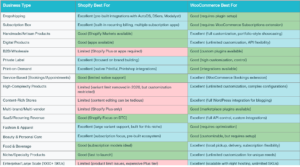
Business Types & Categories: Which Platform is Right?
Your business model and product type heavily influence platform choice.
Detailed Business Category Analysis
Dropshipping:
- Shopify: Excellent (seamless AutoDS/DSers integrations, minimal overhead)
- WooCommerce: Requires setup, but more flexible for custom rules
- Recommendation: Shopify for speed, WooCommerce for customization
Subscription Box & Recurring Revenue:
-
- Shopify: Excellent (native recurring billing, app ecosystem designed for this)
- WooCommerce: Good (WooCommerce Subscriptions extension required)
- Recommendation: Shopify – built for this model
Handmade & Artisan Products:
- Shopify: Good (brand-focused, clean templates)
- WooCommerce: Excellent (portfolio-style customization, full control)
- Recommendation: WooCommerce for unique brand identity, Shopify for speed
Digital Products & SaaS:
- Shopify: Good (apps available, but limited flexibility)
- WooCommerce: Excellent (unlimited customization, API control, recurring revenue models)
- Recommendation: WooCommerce for complex SaaS needs, Shopify for simple digital goods
B2B & Wholesale:
- Shopify: Limited (Shopify Plus required for advanced B2B)
- WooCommerce: Good (custom plugins, flexible pricing, quote management)
- Recommendation: WooCommerce – designed for B2B complexity
Private Label & Branded Products:
- Shopify: Excellent (brand-focused, professional templates, fast launch)
- WooCommerce: Good (unlimited customization, brand control)
- Recommendation: Shopify for speed-to-market, WooCommerce for long-term brand control
Fashion & Apparel:
- Shopify: Excellent (2,048 variants per product as of Winter 2026, size/color variants)
- WooCommerce: Good (requires optimization for large catalogs)
- Recommendation: Shopify – optimized for fashion SKU complexity
Beauty & Personal Care:
- Shopify: Excellent (subscription model ecosystem, loyalty programs)
- WooCommerce: Good (flexible, but requires more setup)
- Recommendation: Shopify for subscription focus, WooCommerce for indie brands
Food & Beverage:
- Shopify: Good (subscription delivery models, Shopify Markets for international)
- WooCommerce: Excellent (local pickup, custom delivery rules, recurring orders)
- Recommendation: WooCommerce for local operations, Shopify for national subscriptions
Enterprise & High-Volume Operations (1000+ SKUs):
- Shopify: Limited (product limits, expensive Shopify Plus at $2,000+/month)
- WooCommerce: Excellent (unlimited SKUs, enterprise-grade flexibility)
- Recommendation: WooCommerce – only option for true enterprise scale
Service-Based Businesses (Appointments, Consulting):
- Shopify: Limited (minimal booking/appointment support)
- WooCommerce: Excellent (WooCommerce Bookings extension, fully customizable)
- Recommendation: WooCommerce – designed for service scheduling
Multi-Brand/Multi-Vendor Marketplace:
- Shopify: Limited (Shopify Plus only, very expensive)
- WooCommerce: Good (Dokan, MVendor plugins available)
- Recommendation: WooCommerce – more cost-effective for marketplaces
Technical Requirements & Ease of Use
WooCommerce: Steeper Learning Curve
Technical Skills Needed:
- WordPress administration and best practices
- Basic PHP and JavaScript knowledge (for customization)
- Server/hosting management (if self-hosted)
- Database management (MySQL)
- SEO and performance optimization concepts
Time to Launch:
- With developer: 2-8 weeks (depending on complexity)
- DIY beginner: 4-12 weeks (steep learning curve)
- DIY experienced: 1-3 weeks
Learning Resources:
- WordPress.org documentation
- WooCommerce.com guides
- YouTube tutorials (widely available)
- Community forums (active, helpful)
- Developer communities (strong ecosystem)
Support Model:
- Community forums (free)
- Documentation (free)
- Paid support from agencies/freelancers ($50–$250+/hour)
- No official phone/chat support from WooCommerce
Shopify: Gentle Learning Curve
Technical Skills Needed:
- None! Shopify is designed for non-technical users
- Optional: Basic HTML/CSS for theme customization
- Optional: Liquid template language (Shopify’s proprietary language)
Time to Launch:
- Complete beginners: 24-48 hours
- With premium theme customization: 1-2 weeks
- With professional design: 2-4 weeks
Learning Resources:
- Shopify Academy (free, comprehensive)
- In-app help guides (contextual and helpful)
- Shopify Community forums (active, Shopify staff participates)
- YouTube tutorials (abundant)
- Paid courses (available but not necessary)
Support Model:
- 24/7 live chat support (Basic plan: email only; higher plans: chat)
- Community forums (Shopify-moderated)
- Official documentation (clear and well-maintained)
- No phone support (except enterprise)
Verdict: Ease of Use
Shopify wins decisively for beginners and non-technical entrepreneurs. WooCommerce is suitable for developers, agencies, or businesses willing to invest in professional help.
Multi-Channel Selling & Integrations
WooCommerce Multi-Channel
Challenges:
- Multi-channel requires individual plugin integrations
- Quality and maintenance varies by plugin
- Manual synchronization of inventory across channels
- Limited native marketplace integration
Available Integrations:
- Amazon integration (various plugins, inconsistent quality)
- eBay listing (limited, not seamless)
- Facebook/Instagram (requires separate setup)
- Marketplace syncing (variable quality)
Best Approach: Use API integrations with services like Zapier or custom development for multi-channel consistency.
Shopify Multi-Channel
Advantages:
- Native integration with major channels
- Automatic inventory synchronization
- Unified order management
- Built-in fulfillment tracking
Integrated Channels:
- Amazon (native integration)
- Facebook & Instagram shops
- TikTok Shop (growing support)
- Shopify Marketplace (1st-party sales channel)
- Google Shopping (automatic feed)
- Pinterest Ads (built-in)
Omnichannel Features:
- Unified inventory across all channels
- Central order dashboard
- Automated customer communication
- Consolidated reporting
Verdict: Multi-Channel
Shopify wins for businesses selling across multiple channels. Inventory synchronization and order management are dramatically easier on Shopify.
B2B Capabilities
WooCommerce: Flexible but Requires Plugins
B2B Features (via plugins):
- Custom customer groups with tiered pricing
- Wholesale pricing rules
- Quote management and approval workflows
- Bulk order functionality
- Minimum order quantities
- Custom purchase orders
Popular B2B Plugins:
- B2B for WooCommerce
- B2BKing
- WooCommerce Wholesale Pro
Challenges:
- Requires finding and integrating the right plugins
- Plugin quality varies
- Ongoing maintenance needed
- Can become complex with many extensions
Shopify: Limited Unless You’re on Shopify Plus
Shopify B2B (Standard Plans):
- Limited native B2B support
- Apps available but often expensive and limited in scope
- Not designed for complex B2B workflows
Shopify Plus B2B:
- Custom pricing and catalogs per customer
- Quote management
- Purchase order integration
- Tiered account management
- Better, but still not as flexible as WooCommerce
Cost Implications:
- Standard Shopify: $39-$299/month (limited B2B)
- Shopify Plus: $2,000-$40,000/month (proper B2B support)
Verdict: B2B
WooCommerce wins decisively for B2B operations at any scale. Shopify Plus is viable for enterprise B2B but at a significant cost premium.
Security, Compliance & Maintenance
WooCommerce: Your Responsibility
Security:
- You’re responsible for all updates and patches
- Plugin vulnerabilities can be exploited if not updated promptly
- Requires security awareness and regular maintenance
- SSL certificates included (most managed hosting)
- GDPR compliance requires manual configuration
Maintenance:
- WordPress core updates (regular)
- Plugin updates (frequent, critical)
- Theme updates (periodic)
- Database optimization (manual)
- Backup strategy (your responsibility)
- Performance monitoring (your responsibility)
Time Commitment: 2-4 hours/month for an active store (or hire agency support)
Shopify: Fully Managed
Security:
- PCI-DSS Level 1 compliance (highest standard)
- SSL included
- Automatic security updates
- DDoS protection
- Regular security audits
- GDPR compliance built-in
Maintenance:
- Automatic updates
- No user-facing maintenance required
- Backup managed by Shopify
- Performance monitoring by Shopify
- 99.9% uptime SLA
Time Commitment: Minimal (Shopify handles everything)
Verdict: Maintenance
Shopify wins for hands-off operation and compliance. WooCommerce requires proactive management but gives complete control.
Payment Processing & Gateways
WooCommerce: Maximum Flexibility
Payment Gateway Options:
- Stripe (any merchant account)
- PayPal (all variations)
- Square
- Authorize.net
- 2Checkout
- Bank transfers
- Cash on delivery
- Cryptocurrency (Bitcoin, Ethereum)
- Custom payment gateways via API
Advantages:
- No transaction fees from the platform
- Negotiate directly with payment processor
- Complete control over payment flow
- Support for international gateways
- Custom payment logic possible
Cost:
- Payment processor fees only (typically 2.9% + 30¢)
- No additional platform transaction fees
Shopify: Limited to Approved Processors
With Shopify Payments:
- 2.7%-2.9% + 30¢ per transaction (no additional fees)
- Direct integration
- Competitive rates
- Available in 100+ countries
With External Gateways:
- 2.9% + 30¢ per transaction (PLUS additional Shopify fee of 1.5%-2%)
- Additional costs for using non-Shopify payment processors
- Approved gateways only (limited selection)
Limitations:
- Cannot use arbitrary payment processors
- International payment options limited
- Cryptocurrency not supported natively
Cost Impact:
Using Stripe on Shopify: 2.9% + 30¢ (Stripe fee) + 1.5%-2% (Shopify fee) = 4.4%-4.9% per transaction (vs. 2.9% + 30¢ on WooCommerce)
Verdict: Payment Processing
WooCommerce wins for flexibility and lower fees. Shopify is competitive with Shopify Payments but punishes use of external processors.
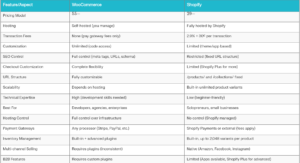
Comparison Table Overview
WooCommerce vs. Shopify: Decision Framework
Choose WooCommerce If:
✓ You need complete customization and control
✓ You’re building complex product configurations
✓ You require custom business logic or integrations
✓ You want to minimize long-term transaction fees
✓ You’re a developer, agency, or technical team
✓ You need unlimited scalability and SKU management
✓ You want superior SEO control
✓ You’re building B2B, wholesale, or marketplace functionality
✓ You need to own your data and infrastructure
✓ Your business requires unique, proprietary features
Choose Shopify If:
✓ You want to launch quickly without technical knowledge
✓ You’re a solopreneur or small business owner
✓ You want predictable, transparent monthly costs
✓ You prefer hands-off platform management
✓ You’re selling dropshipped or print-on-demand products
✓ You need strong multi-channel selling (Amazon, Facebook, Instagram)
✓ You want built-in subscription billing
✓ You prioritize customer support (24/7 chat available)
✓ You don’t want to manage hosting or security
✓ You want the fastest time-to-market
Platform Selection by Business Stage
Pre-Launch & Validation Stage
Recommendation: Shopify
- Why: Lowest setup time and cost, no technical knowledge required, fast validation of product-market fit
- Budget: $39-$100/month
- Timeline: Launch in 24-48 hours
Growth Stage ($50K–$500K ARR)
Recommendation: Shopify or WooCommerce (depends on complexity)
- Shopify: Best if your business model matches Shopify’s strengths (dropshipping, subscriptions, social commerce)
- WooCommerce: Best if you need customization, superior SEO, or B2B functionality
- Budget: $100–$500/month (Shopify) or $200-$500/month (WooCommerce)
Scale Stage ($500K–$5M ARR)
Recommendation: Platform-dependent on business model
- Shopify Advanced Plan: $299-$500/month (if you’ve outgrown Basic but don’t need Plus)
- WooCommerce: $400-$1,000+/month (better TCO at high volume, more flexibility)
- Decision Point: Evaluate cost efficiency vs. flexibility needs
Enterprise Stage ($5M+ ARR)
Recommendation: WooCommerce or Shopify Plus
- Shopify Plus: $2,000-$40,000/month (high cost, but dedicated support)
- WooCommerce: $1,000-$5,000+/month (more cost-effective, full customization)
Alternative: Custom ecommerce platform or enterprise solutions
SEO Implementation Services
At ITX IT Pro, we specialize in optimizing both WooCommerce and Shopify stores for search engine visibility. Whether you’re struggling with Shopify’s URL structure limitations or maximizing WooCommerce’s SEO potential, our team provides:
WooCommerce SEO Optimization
- Custom URL structure design for keyword targeting
- Technical SEO audits and implementation (schema markup, sitemaps, robots.txt)
- Headless commerce strategy for maximum performance
- Page speed optimization and Core Web Vitals improvement
- Content strategy and semantic markup implementation
Shopify SEO Strategy
- Meta tag and title optimization within Shopify’s constraints
- App-based SEO enhancement (Yoast, Rank Math alternatives)
- URL redirect strategy to work around fixed URL segments
- On-page optimization and structured data implementation
- Organic traffic growth strategies specific to Shopify’s limitations
Learn more about our SEO services
Platform Migration & Implementation
Moving from one platform to another is complex. Our team provides:
WooCommerce Implementation
- Custom store setup and configuration
- Theme development and customization
- Plugin integration and testing
- Data migration and inventory setup
- Security hardening and performance optimization
Learn more: https://itxitpro.ae/ecommerce/woocommerce/
Shopify Store Setup & Optimization
- Professional store setup and theme customization
- App selection and integration
- Data import and product catalog configuration
- Conversion rate optimization
- Ongoing performance monitoring
Learn more: https://itxitpro.ae/ecommerce/shopify/
Conclusion: Making Your Decision
The choice between WooCommerce and Shopify is not about which platform is “better”—it’s about which platform better serves your specific business needs, technical capabilities, and growth trajectory.
WooCommerce offers unmatched flexibility, control, and long-term cost efficiency for businesses with complex requirements or ambitious scale.
Shopify delivers unmatched simplicity, speed-to-market, and hands-off operation for entrepreneurs who want to focus on business, not technology.
Your Next Steps:
- Identify your business type using our Business Category Comparison chart
- Calculate your true cost of ownership using the pricing breakdown
- Assess your technical capabilities honestly
- Consider your growth timeline and long-term vision
- Consult with implementation partners (like ITXIT Pro) before committing to a platform
The right platform decision today will save you months of frustration, thousands of dollars, and countless hours of rework down the road. Choose wisely.





Author Bio

Discover More Collaborative Development Initiatives
Stay ahead of the curve with expert tips, industry trends, and
actionable strategies—designed
to help your business thrive in the digital era.








 UAE
UAE
1801, API World Tower, SZR, Dubai,
United Arab Emirates
 India
India
Jaipur, Rajasthan
 USA
USA
Charlotte, United States
 CANADA
East Scarborough, Canada


